Cohort served
Around 450Approximate audience of the cohort mailing lists, not a count of active users.College email briefing and dashboard
Email Command Centre
A college email briefing that helped a student catch a competition registration they thought they had missed.
Result so far
The briefing serves a cohort of around 450 students. In one reported example, it helped a student register for a Flipkart case competition while applications were still open.
My contribution
I built the dashboard, then added an automated email digest after classmates said they did not want another website to check. I maintain the workflow, source links and checks for changed or unclear deadlines. The briefing is sent to cohort mailing lists serving around 450 students.
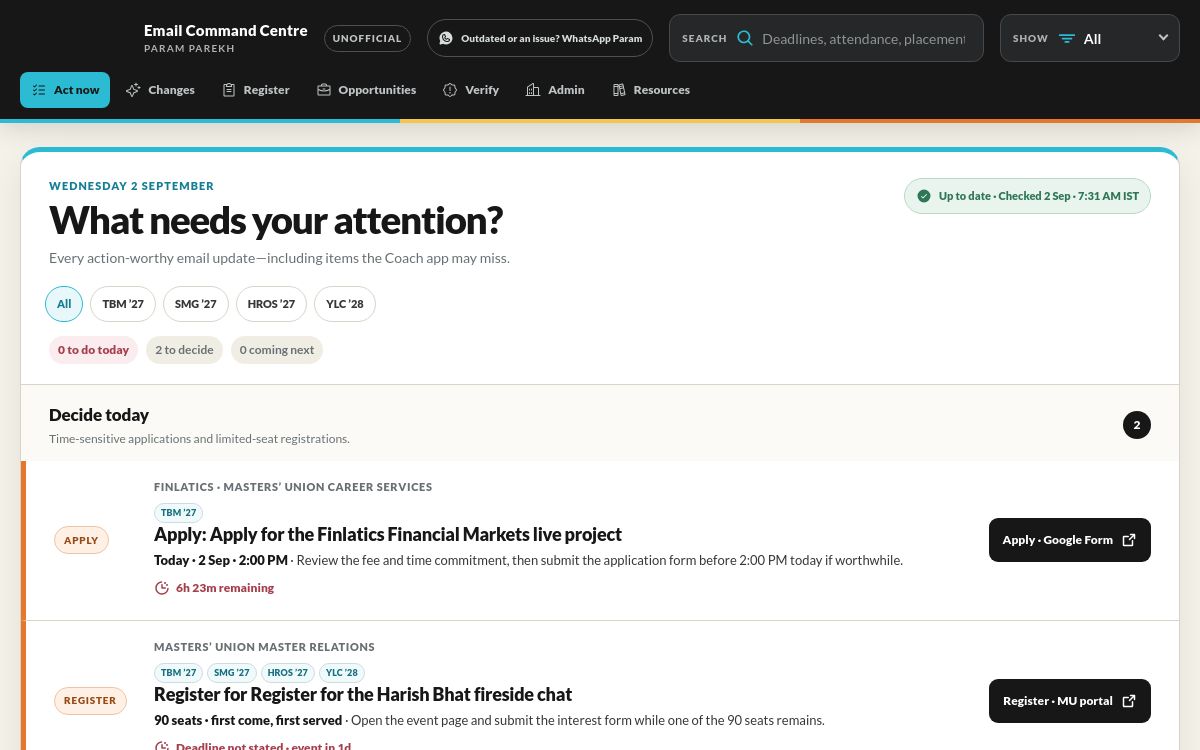
The original dashboard · the briefing now arrives by email
Open full-size image ↗Open product ↗01 / The problem
Where it started.
During my MBA, useful information arrived in a stream of emails: submission dates, internships, competitions, resources and changes to earlier announcements. Our LMS covered coursework, but plenty of email-based deadlines sat outside it. I was struggling to keep up too.
The decision
Deliver the reminder where students already look. Keep the dashboard for detail, while the email tells them what is coming up and where to act.
The registration that was still open
One student had missed the deadline communicated by college for a Flipkart case competition. The actual registration window stayed open for another two days. My email reminded them about it, and they were able to apply.
That is the kind of impact I wanted: helping someone act on an opportunity that would otherwise have slipped past them.
Why I changed the product
A classmate pointed out that we already had an LMS and enough apps to check. The missing piece was a reminder for the useful information buried in email. I added a digest so the next deadline could arrive in the inbox with a link to the details.
The website began in July 2026. Recorded cohort sends followed in August. The digest initially ran on Sundays and Wednesdays; it now goes out on Sundays only.
02 / The approach
How I worked through it.
- 01
Build a dashboard to organise deadlines, opportunities and useful links from college emails.
- 02
Listen to classmates who preferred reminders in their existing inbox.
- 03
Add an automated digest, initially on Sundays and Wednesdays, later moving to Sundays only.
- 04
Keep source links, changed announcements and uncertain dates visible so readers can check the original.
Workflow
How it works
- 01Collect
Read the relevant college emails.
- 02Organise
Group actions, dates, opportunities and resources.
- 03Check
Flag unclear details and changed information.
- 04Share
Update the dashboard and Sunday email briefing.
03 / The evidence
What the work produced.
A reported outcome
Flipkart registrationA student was reminded to apply while registration was still open.Product change
Dashboard → emailClassmate feedback led me to add reminders directly in the inbox.Current rhythm
Sunday briefingThe email is now weekly; the dashboard is updated separately.The dashboard and sent-email history establish the product and its evolution. Audience size and the Flipkart example are from my account; they do not establish an adoption rate or a competition result caused by the tool.
04 / Looking back
What I took away.
The most useful feedback was that people did not want another place to check. Moving the briefing into email made it fit how they already kept up with college. The Flipkart example gave me a concrete reason to keep improving it.
- A useful dashboard still asks people to form a new habit. An email reminder can fit an existing one.
- The date in a college announcement and the actual registration window can differ; readers need the source link.
What I would measure next
Measure repeat use and collect more dated examples of actions people took. Track missed items and corrections too. I have not measured time saved or a cohort-wide reduction in missed deadlines.
Scope & confidentiality
The public portfolio does not expose private inbox contents, student data or authentication details.